
Book clubs put real effort into their reading lists. But those lists have always stayed inside Bookclubs. Whether you want to show off your club's picks on social media or keep an offline copy of what you've read and discussed, there was no easy way to do it. Now there are two.
Share your reading list on social media
Publicly listed clubs can now share their reading lists to Facebook, Instagram, X, and beyond with a Bookclubs Pro or Pro Plus subscription. Your club's shelves (Currently Reading, Want to Read, and Books We've Read) each have a Share button, so you can post just the shelf you want. Anyone who follows the link can view it without a Bookclubs account.
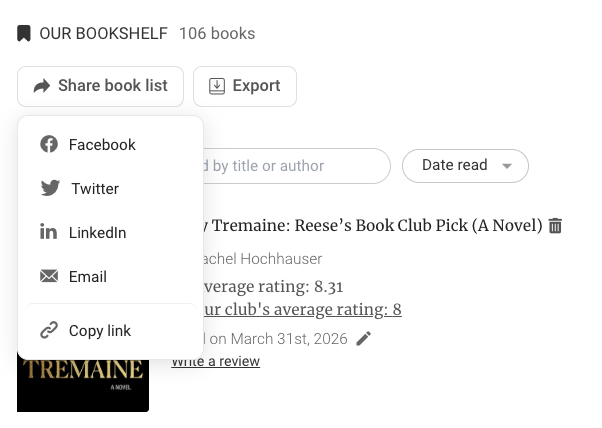
On mobile, tap Share Reading List in the header of your club's bookshelf to share a link to all three shelves at once.
Export your lists as a PDF
Club admins can now export any bookshelf as a PDF sent straight to their email. Meetings and polls are exportable too. Click the Export button on any of those pages and the PDF lands in your inbox — useful for printing before an in-person meetup, or sharing with members who are less tech-savvy
Export is available to admins of all Bookclubber Pro and Pro Plus clubs, including private ones.
How to find it
On the web, look for the Share or Export button on your club's bookshelf, meeting, and poll pages. On mobile, tap Share Reading List in the header of your club's bookshelf screen. Your club must be subscribed to Bookclubber Pro or Pro Plus for access to these features.
Head to your club's reading list and give it a try. 📚
Not a Bookclubs member yet? Join Bookclubs and find or start a book club today.